Back to insight logs
Automation
Getting Paid Faster: The Automated Invoice Follow-Up That Ends The Chase
✔ HIGH-VALUE KEY PRINCIPLES IN BRIEF
1
Automated reminders get invoices paid faster.
2
Consistent nudges end the awkward manual chase.
3
Faster payment steadies your cash flow.
You send the invoice, set the due date, and wait. The deadline passes. Then you spend an hour writing an awkward follow-up email that starts with, "Just checking in."
An automated invoice follow-up keeps payments moving without turning every client relationship into a collection call. The right workflow sends timely reminders, tracks replies, flags overdue accounts, and gives you more time for sales and client work. Startize Systems helps service businesses connect CRM automation with the systems already driving their growth through business automation systems.
The goal isn't to pressure good clients. It's to stop relying on memory, scattered spreadsheets, and inconsistent follow-up.
Why Late Payments Keep Small Businesses Stuck
Late invoices create cash flow gaps. Payroll still runs. Ad spend still goes out. Software subscriptions still renew. Revenue may look healthy on paper, but the money isn't in your account when you need it.
That gap forces owners into a second job: full-time payment collector. You check open invoices, search email threads, remember who promised to pay Friday, and decide whether another reminder will sound too aggressive.
Most late payments aren't personal. A client may have missed the email, lost the invoice, or sent it to the wrong person internally. That doesn't make the problem less expensive. It means your process needs to work even when people are busy.
The hidden cost of manual invoice follow-up
Manual follow-up creates small tasks that keep multiplying.
You check a spreadsheet. You compare dates. You open the accounting platform. You copy an email template. You rewrite the first sentence because this client is overdue by three days, while another is overdue by three weeks.
The work feels manageable until you have 20, 40, or 100 active invoices. Then one missed reminder can delay payment even when the client is ready and able to pay.
The cost isn't only your time. Missed follow-ups make cash flow harder to forecast. They also create uneven client communication, which makes the business look less organized than it is.
A better payment process starts before the invoice is overdue
Automation can't fix confusing billing. The invoice still needs to be easy to understand and easy to pay.
Set clear payment terms before work begins. State the due date, accepted payment methods, deposit requirements, milestone amounts, and any late fee policy allowed by your agreement. Put the policy in your proposal or contract, not in a surprise email after the deadline.
Give clients a direct payment path. A visible payment link removes friction. So does sending the invoice to the person who approves payments, not only the person who hired you.
The best reminder is often the one the client never needs because the invoice was clear, timely, and easy to pay.
How an Automated Invoice Follow-Up Moves an Invoice to Payment
Automated invoice follow-up is a set of rules that watches invoice status and sends the next message when a condition is met.
The condition might be a date, such as three days before the invoice is due. It might be an action, such as a client opening the invoice but not paying. It might be a status change, such as a failed card payment.
A useful system starts when the invoice is created. It records the sent date and due date, sends the invoice through your billing tool, and waits for the next event. If payment arrives, the workflow stops. If payment doesn't arrive, the next reminder is sent.
Payment reminders work better when they stay short, accurate, and connected to a clear payment option. Stripe's payment reminder guidance covers the basic structure businesses can use without making the message sound hostile.

### A practical reminder sequence that doesn't feel pushy
A simple sequence is enough for many service businesses:
Send a friendly reminder three to five business days before the due date.
Send a due-date notice with the invoice and payment link.
Send a polite overdue message two to five days after the deadline.
Send a firmer final notice when the account needs personal review.
The exact timing depends on your terms, project size, and client relationship. A $500 recurring invoice doesn't need the same tone as a $25,000 project milestone.
Keep the language factual. Name the invoice, state the balance, include the due date, and give the client a way to ask for help. Don't threaten legal action or add fake urgency to a normal billing issue.
What the system should track automatically
Your workflow should record:
The invoice sent date and due date
Current payment status
Reminder history and delivery status
Client replies and requested follow-up
Bounced emails
Failed payment attempts
Escalation status
Payment confirmation
These records prevent duplicate reminders and give your team a clean view of each account. An alert should reach the owner when a client disputes an invoice, asks for a payment plan, or replies that payment was already sent.
GoHighLevel can help manage communication and workflow rules, but it isn't automatically a complete accounting platform. Keep accounting and payment records in the tools built for those jobs. Use the CRM to keep customer communication and follow-up organized.
The Best Automated Invoice Follow-Up Workflow for Service Businesses
Agencies, contractors, consultants, marketing firms, and other service businesses usually have more than a billing problem. They have disconnected systems.
Leads enter through Facebook ads, Google Ads, SEO, referrals, or Local Service Ads. Sales follow-up happens in a CRM. Project details sit in email. Invoices live in accounting software. Payment reminders depend on someone's memory.
That creates gaps. A lead can be qualified but never called. A client can be active but never reminded. A paid invoice can stay in an overdue sequence because two systems aren't sharing status.
The service business automation results from Startize Systems show the broader value of connecting acquisition, follow-up, and operational systems around measurable outcomes.
### Connect invoices to your CRM and payment tools
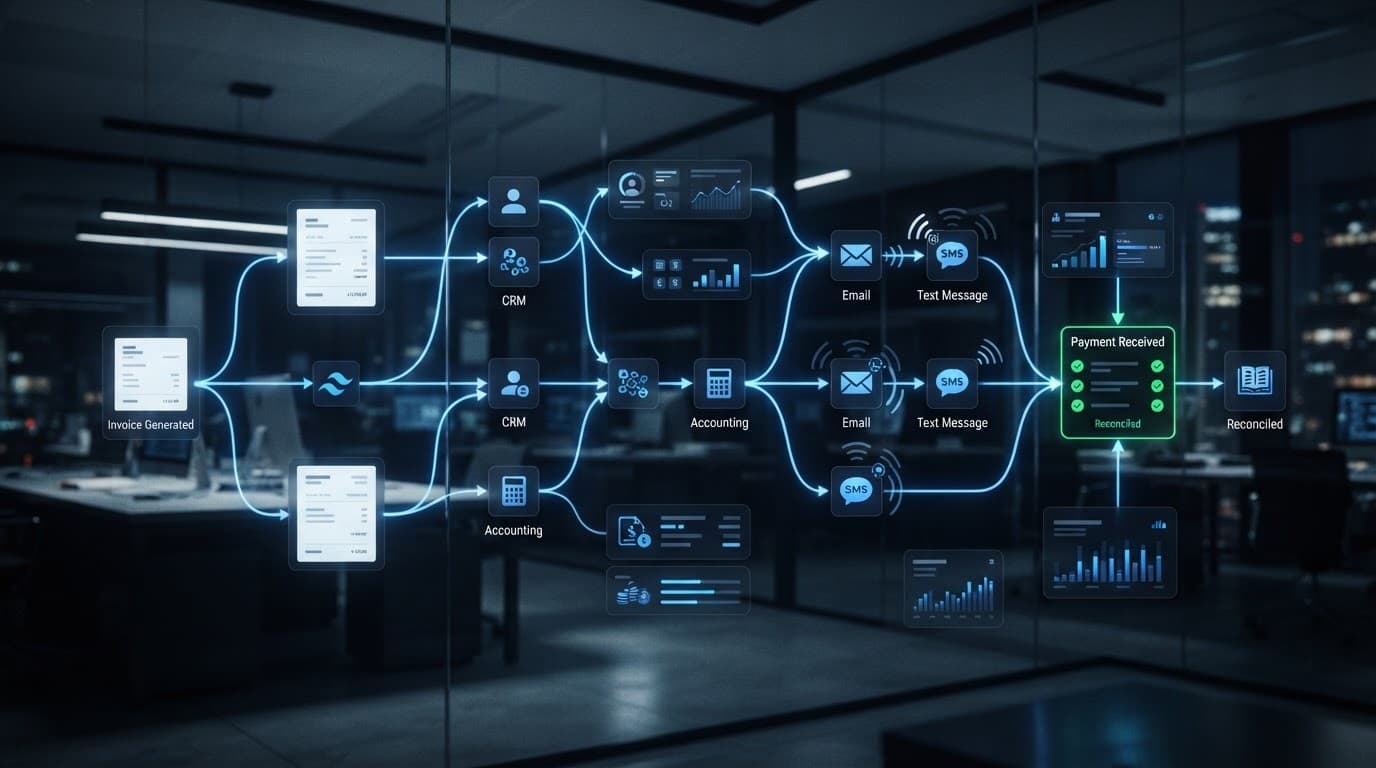
Connect the CRM with invoicing, accounting, email, text messaging, and online payment tools where practical.
The point isn't to replace your accounting software. The point is to reduce manual entry and keep communication tied to the right client record.
A connected workflow might look like this:
A signed proposal creates the client record and onboarding task.
A project milestone triggers an invoice.
The invoice status returns to the CRM.
Payment stops future reminders automatically.
An overdue status creates a task for the right team member.
Tools such as webhooks and native integrations can pass these status changes between systems. A workflow automation guide from Trimble on payment reminders shows how date-based reminders can support billing operations without relying on manual checks.
Use email and text at the right moments
Email is the formal channel. Use it for invoice details, account history, terms, and payment links.
Text works better for short reminders when the customer has given consent for business messages. Keep the message professional and useful:
"Invoice 1048 is due today. Pay here: [link]. Reply if you need a copy."
Don't send five messages in two days. Don't use threatening language. Don't text a client who has already paid because the payment status failed to sync.
For more examples of short payment messages, review these SMS payment reminder templates. Use the structure, not the canned tone.
Know when automation should hand the account to a person
Automation should handle routine reminders. People should handle sensitive conversations.
Create an escalation task when:
The client disputes the invoice.
Multiple payment attempts fail.
The unpaid balance is large.
A long-term client becomes overdue.
The customer requests a payment plan.
The invoice is far beyond its due date.
The client says the work is incomplete or incorrect.
A business owner may choose a different response for a major account than for a one-time customer. Rules can identify the issue, but judgment still belongs with a person.
How to Choose the Right Invoice Reminder Software
The right tool depends on your invoice volume, current software, team size, and need for customization.
A solo consultant with eight active clients may only need automatic reminders inside an invoicing platform. A growing agency with recurring retainers, several account managers, paid lead generation, and multiple payment methods needs stronger connections between CRM, billing, and customer communication.
Ignore flashy dashboards until the basic mechanics work. A good system must send the right message, stop when payment arrives, and show you what needs attention.
Readers looking at the larger picture can find more practical guidance in these CRM automation insights, including workflow connections that keep data from falling between tools.
Features worth paying for
Look for features that reduce manual work and protect accuracy:
Automatic triggers based on invoice and due dates
Custom email and text templates
Payment status syncing
Client reply tracking
Failed-payment alerts
Payment links
Reporting by client, invoice, and status
User permissions
Delivery and bounce reporting
Audit logs
Flexible rules matter when your billing isn't identical for every client. Deposits, milestone invoices, retainers, recurring billing, and late approvals all need different timing.
The best automated invoice follow-up software lets you set those rules without rebuilding the whole workflow every time your pricing model changes.
When a simple tool is enough, and when you need a connected system
A basic invoicing platform is enough when your client list is small, invoices are predictable, and one person manages sales, delivery, and billing.
A connected CRM system becomes more useful when you have:
Multiple lead sources and sales pipelines
Recurring clients across different services
Several staff members handling accounts
Sales follow-up and billing follow-up in the same customer journey
High-value invoices that need escalation
Overdue accounts spread across multiple tools
If your ads, SEO, CRM, sales follow-up, and billing process are disconnected, adding another standalone tool may create more work. The business automation systems built by Startize Systems connect the parts that affect lead flow, booked calls, and revenue.
Measure Whether Automated Follow-Up Is Getting You Paid Faster
A reminder workflow needs a scorecard. Otherwise, you're replacing one guess with another.
Track average days to pay, the percentage of invoices paid on time, total overdue balance, reminder-to-payment conversion rate, failed-payment recovery, and hours spent on collections each month.
Review the workflow after the first billing cycle. Test timing, subject lines, message length, and payment-link placement. Keep what produces payment without creating unnecessary client replies.
Set a baseline before changing the process
Record your current numbers for at least one billing cycle:
Average time between invoice date and payment
Percentage paid by the due date
Total overdue invoice value
Number of overdue invoices
Hours spent on payment follow-up
Write down the starting point before automation goes live. A lower overdue balance matters, but so does the time you recover each week.
You may discover that the biggest improvement comes from one reminder before the due date. You may find that failed card payments create more delay than forgotten invoices. The data tells you where the leak is.
Protect trust while improving cash flow
Faster payment isn't worth damaging a strong client relationship.
Reminders need accurate balances, correct due dates, working payment links, and a clear way to contact your team. The workflow should pause immediately when an invoice is paid or when someone reports a billing issue.
Consistency also improves how the business looks. Clients don't have to guess whether you forgot the invoice, changed the terms, or lost track of their account. They receive a clear message at a reasonable time.
A professional billing process doesn't chase harder. It removes confusion and gives every account the same reliable next step.
The Chase Ends When the Process Stops Depending on Memory
Automated invoice follow-up replaces spreadsheets, calendar alerts, and uncomfortable chasing with timed reminders and clear escalation rules.
The strongest setup starts with clear payment terms. It connects your CRM, invoicing, accounting, messaging, and payment tools. It uses email and text with restraint. It sends sensitive issues to a real person.
If your follow-up, CRM, and growth systems aren't connected, Book a Call to discuss a practical setup for your business. Getting paid faster starts with a process that runs before the invoice becomes a problem.

Jackson Kolinski
Based in Wisconsin, Jackson designs and integrates direct-response acquisition pipelines, on-page SEO schema algorithms, and automated customer relationship messaging workflows under strict ROI frameworks.
Want your CRM to run this mathematical sequence?
Schedule our 90-second system audit and book your free direct operational review session. No complex pitch. Just real coordinates.